
Your first story
A story is a normal test with three extra lines in it. You keep your framework’s describe, your assertions, and your runner. The steps you mark become the documentation.
Write a story
Section titled “Write a story”Create src/login.story.test.ts:
import { story } from 'executable-stories-vitest';import { describe, expect, it } from 'vitest';
describe('Login', () => {  it('user logs in successfully', ({ task }) => {    story.init(task);
    story.given('the user is on the login page');    story.when('the user submits valid credentials');    story.then('the user should see the dashboard');    expect(true).toBe(true); // replace with real assertions  });});
Call story.init(task) first, passing task from the test callback. Everything after it is a step.
pnpm vitest runCreate src/login.story.test.ts:
import { expect } from '@jest/globals';import { story } from 'executable-stories-jest';
describe('Login', () => {  it('user logs in successfully', () => {    story.init();
    story.given('the user is on the login page');    story.when('the user submits valid credentials');    story.then('the user should see the dashboard');    expect(true).toBe(true); // replace with real assertions  });});
story.init() takes no argument. Jest reads the test name from expect.getState(), which is why the setup file is required.
Jest also exports top-level given, when, then, and, and but if you prefer them to the story object.
pnpm jestCreate src/login.story.spec.ts:
import { expect, test } from '@playwright/test';import { story } from 'executable-stories-playwright';
test.describe('Login', () => {  test('user logs in successfully', async ({ page }, testInfo) => {    story.init(testInfo);
    story.given('the user is on the login page');    await page.goto('/login');
    story.when('the user submits valid credentials');    await page.getByLabel('Email').fill('user@example.com');    await page.getByLabel('Password').fill('secret');    await page.getByRole('button', { name: 'Sign in' }).click();
    story.then('the user sees the dashboard');    await expect(page).toHaveURL(/dashboard/);  });});
Pass testInfo from the second callback argument. Your fixtures work as they always did.
To hand fixtures to step callbacks, initialise with story.init({ page }, testInfo) and each step receives them:
await story.given('the user is on the login page', async ({ page }) => { await page.goto('/login');});pnpm playwright testCreate cypress/e2e/calculator.story.cy.ts:
import { story } from 'executable-stories-cypress';
describe('Calculator', () => {  it('adds two numbers', () => {    story.init();
    story.given('two numbers 5 and 3');    const a = 5, b = 3;
    story.when('I add them together');    const result = a + b;
    story.then('the result is 8');    expect(result).to.equal(8);  });});
story.init() takes no argument; Cypress supplies the test name. Metadata reaches Node over cy.task, which the support file wires up for you.
pnpm cypress runCreate login_test.go:
package login_test
import (  "os"  "testing"
  es "github.com/jagreehal/executable-stories/packages/executable-stories-go")
func TestMain(m *testing.M) {  os.Exit(es.RunAndReport(m))}
func TestUserLogsInSuccessfully(t *testing.T) {  s := es.Init(t, "user logs in successfully")
  s.Given("the user is on the login page")  email := "user@example.com"  password := "secret"
  s.When("the user submits valid credentials")  result := email == "user@example.com" && password == "secret"
  s.Then("the user should see the dashboard")  if !result {    t.Fatal("expected login to succeed")  }}
es.Init returns the story. Steps are methods on it, so nothing is global.
go test ./...npx --package executable-stories-formatters executable-stories format --format markdownCreate test_login.py:
from executable_stories import story
def test_user_logs_in_successfully():    story.init("user logs in successfully")
    story.given("the user is on the login page")    email = "user@example.com"    password = "secret"
    story.when("the user submits valid credentials")    result = email == "user@example.com" and password == "secret"
story.then("the user should see the dashboard") assert resultpytestnpx --package executable-stories-formatters executable-stories format --format markdownMinitest, in test/login_test.rb:
require "minitest/autorun"require "executable_stories/minitest"
class LoginTest < Minitest::Test  def test_user_logs_in_successfully    story = ExecutableStories.init("user logs in successfully")
    story.given("the user is on the login page")    email = "user@example.com"    password = "secret"
    story.when("the user submits valid credentials")    result = email == "user@example.com" && password == "secret"
    story.then("the user should see the dashboard")    assert_equal true, result  endend
RSpec, in spec/login_spec.rb:
require "executable_stories/rspec"
ExecutableStories::RSpecPlugin.install!
RSpec.describe "Login" do  story "user logs in successfully" do |s|    s.given("the user is on the login page")    email = "user@example.com"    password = "secret"
    s.when("the user submits valid credentials")    result = email == "user@example.com" && password == "secret"
s.expect("the user should see the dashboard") do expect(result).to be(true) end endendbundle exec rake test # or: bundle exec rspecnpx --package executable-stories-formatters executable-stories format --format markdownCreate tests/login.rs:
use executable_stories::Story;
#[test]fn user_logs_in_successfully() {    let mut s = Story::new("user logs in successfully");
    s.given("the user is on the login page");    let email = "user@example.com";    let password = "secret";
    s.when("the user submits valid credentials");    let authenticated = email == "user@example.com" && password == "secret";
    s.then("the user should see the dashboard");    assert!(authenticated);}
That is the whole setup. The story records pass or fail when it drops, and the first one registers a process-exit hook that writes the run JSON.
A failing assertion panics, and a story dropped mid-unwind records fail. Only a #[test] returning Result escapes that, since returning Err never panics. Route the fallible call through s.record_result(...), or call s.fail() yourself.
cargo testnpx --package executable-stories-formatters executable-stories format --format markdownCreate src/test/kotlin/LoginTest.kt:
import dev.executablestories.junit5.Storyimport org.junit.jupiter.api.Test
class LoginTest {
    @Test    fun `user logs in successfully`() {        Story.init("user logs in successfully")
        Story.given("the user is on the login page")        val email = "user@example.com"        val password = "secret"
        Story.`when`("the user submits valid credentials")        val authenticated = email == "user@example.com" && password == "secret"
Story.then("the user should see the dashboard") assert(authenticated) }}StoryTestExecutionListener registers itself, so there is no extra wiring.
./gradlew testnpx --package executable-stories-formatters executable-stories format --format markdownCreate LoginTests.cs:
using ExecutableStories.Xunit;using Xunit;
public class LoginTests{    [Fact]    public void UserLogsInSuccessfully()    {        Story.Init("user logs in successfully");
        Story.Given("the user is on the login page");        var email = "user@example.com";        var password = "secret";
        Story.When("the user submits valid credentials");        var authenticated = email == "user@example.com" && password == "secret";
        Story.Then("the user should see the dashboard");        Assert.True(authenticated);    }}
This relies on [assembly: StoryRecording] being present somewhere in the test project. Without it, nothing is recorded.
dotnet testnpx --package executable-stories-formatters executable-stories format .executable-stories/raw-run.json --format markdownWhat you get
Section titled “What you get”Whichever adapter you used, the Markdown comes out the same:
### ✅ User logs in successfully
- **Given** the user is on the login page- **When** the user submits valid credentials- **Then** the user should see the dashboard
A skipped, failed, or planned step is marked as such, so the document reports the run rather than describing an intention.
Render the same run as HTML and you get a searchable report:
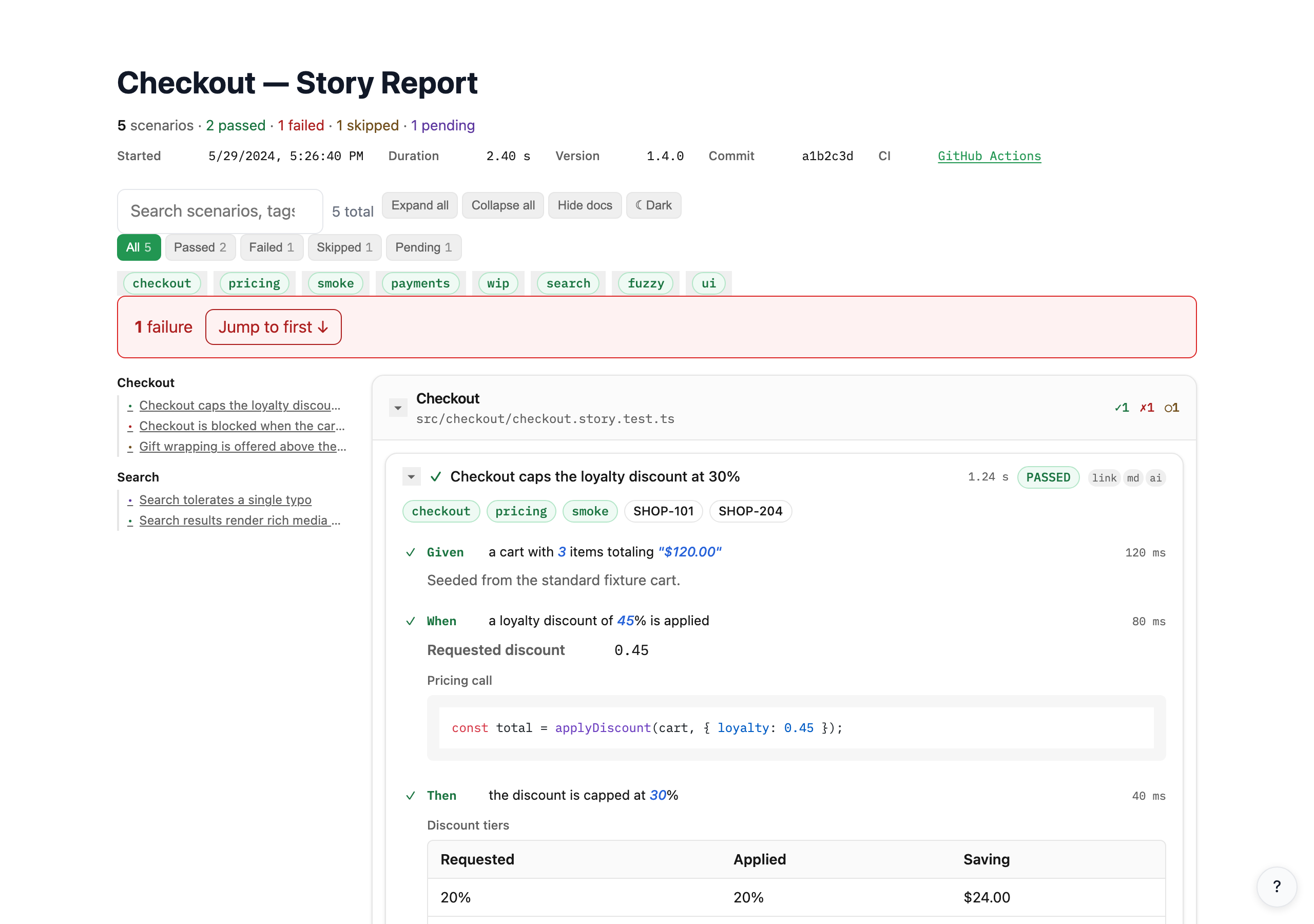
Keyword repetition becomes And
Section titled “Keyword repetition becomes And”Repeat given, when, or then anywhere in a story and the second occurrence onward renders as And. Write what you mean and let the report read like prose:
story.given('the user account exists');story.given('the account is suspended'); // renders as Andstory.when('the user submits valid credentials');story.then('the user should see an error message');story.but('the user should not be logged in'); // always Butand() and but() never convert. Use but() when the contrast is the point, exactly as Gherkin does.
Add context to a scenario
Section titled “Add context to a scenario”Steps carry the narrative. Doc entries carry the evidence: the payload you sent, the table you checked, the diagram of the flow.
it('user logs in with valid credentials', ({ task }) => {  story.init(task, { tags: ['auth', 'smoke'], ticket: 'AUTH-42' });
  story.given('the user has a registered account');  story.and('the user is on the login page');  story.json({    label: 'Credentials',    value: { email: 'user@example.com', password: 'secret' },  });
  story.when('the user submits valid credentials');
story.then('the user should receive an auth token'); story.table({ label: 'Token fields', columns: ['Field', 'Type', 'Description'], rows: [ ['token', 'string', 'JWT bearer token'], ['expiresIn', 'number', 'Seconds until expiry'], ], }); story.note('Token rotation is handled automatically on refresh.');});it('user logs in with valid credentials', () => { story.init({ tags: ['auth', 'smoke'], ticket: 'AUTH-42' });
story.given('the user has a registered account'); story.and('the user is on the login page'); story.json({ label: 'Credentials', value: { email: 'user@example.com', password: 'secret' }, });
story.when('the user submits valid credentials');
story.then('the user should receive an auth token'); story.table({ label: 'Token fields', columns: ['Field', 'Type', 'Description'], rows: [ ['token', 'string', 'JWT bearer token'], ['expiresIn', 'number', 'Seconds until expiry'], ], }); story.note('Token rotation is handled automatically on refresh.');});test('user logs in with valid credentials', async ({ page }, testInfo) => { story.init(testInfo, { tags: ['auth', 'smoke'], ticket: 'AUTH-42' });
story.given('the user has a registered account'); story.and('the user is on the login page'); story.json({ label: 'Credentials', value: { email: 'user@example.com', password: 'secret' }, });
story.when('the user submits valid credentials');
story.then('the user should receive an auth token'); story.table({ label: 'Token fields', columns: ['Field', 'Type', 'Description'], rows: [ ['token', 'string', 'JWT bearer token'], ['expiresIn', 'number', 'Seconds until expiry'], ], }); story.screenshot({ path: 'dashboard.png', alt: 'The signed-in dashboard' });});it('user logs in with valid credentials', () => { story.init({ tags: ['auth', 'smoke'], ticket: 'AUTH-42' });
story.given('the user has a registered account'); story.and('the user is on the login page'); story.json({ label: 'Credentials', value: { email: 'user@example.com', password: 'secret' }, });
story.when('the user submits valid credentials');
story.expect('the user should receive an auth token', () => { cy.get('[data-token]').should('exist'); }); story.note('Token rotation is handled automatically on refresh.');});func TestUserLoginWithDocs(t *testing.T) { s := es.Init(t, "user logs in with valid credentials", es.WithTags("auth", "smoke"), es.WithTicket("AUTH-42"), )
s.Given("the user has a registered account") s.And("the user is on the login page")
credentials := map[string]string{ "email": "user@example.com", "password": "secret", } s.JSON("Credentials", credentials)
s.When("the user submits valid credentials")
s.Then("the user should receive an auth token") s.Table("Token fields", []string{"Field", "Type", "Description"}, [][]string{ {"token", "string", "JWT bearer token"}, {"expiresIn", "number", "Seconds until expiry"}, }, ) s.Note("Token rotation is handled automatically on refresh.")}def test_user_login_with_docs(): story.init( "user logs in with valid credentials", tags=["auth", "smoke"], ticket="AUTH-42", )
story.given("the user has a registered account") story.and_("the user is on the login page") story.json("Credentials", {"email": "user@example.com", "password": "secret"})
story.when("the user submits valid credentials")
story.then("the user should receive an auth token") story.table( "Token fields", columns=["Field", "Type", "Description"], rows=[ ["token", "string", "JWT bearer token"], ["expiresIn", "number", "Seconds until expiry"], ], ) story.note("Token rotation is handled automatically on refresh.")def test_user_login_with_docs story = ExecutableStories.init( "user logs in with valid credentials", tags: ["auth", "smoke"], ticket: "AUTH-42" )
story.given("the user has a registered account") story.and("the user is on the login page") story.json("Credentials", { email: "user@example.com", password: "secret" })
story.when("the user submits valid credentials")
story.then("the user should receive an auth token") story.table( "Token fields", ["Field", "Type", "Description"], [ ["token", "string", "JWT bearer token"], ["expiresIn", "number", "Seconds until expiry"] ] ) story.note("Token rotation is handled automatically on refresh.")enduse executable_stories::Story;use serde_json::json;
#[test]fn password_rules_enforced() { let mut s = Story::new("password rules are enforced") .with_tags(&["auth", "security"]) .with_tickets(&["AUTH-42"]);
s.given("the user is registering a new account"); s.note("Password policy: min 12 chars, one uppercase, one digit, one symbol");
s.when("the user submits a password that is too short"); let password = "short"; let valid = password.len() >= 12;
s.then("the registration should be rejected"); s.json("validation result", &json!({ "valid": valid, "reason": "too short" })); s.table( "rule summary", &["Rule", "Required", "Met"], &[ vec!["min length 12", "yes", "no"], vec!["uppercase letter", "yes", "yes"], ], );
assert!(!valid);}import dev.executablestories.junit5.Storyimport org.junit.jupiter.api.Test
class PasswordPolicyTest {
@Test fun `password rules are enforced`() { Story.init("password rules are enforced", "auth", "security") Story.ticket("AUTH-42")
Story.given("the user is registering a new account") Story.note("Password policy: min 12 chars, one uppercase, one digit, one symbol")
Story.`when`("the user submits a password that is too short") val password = "short" val valid = password.length >= 12
Story.then("the registration should be rejected") Story.json("validation result", mapOf("valid" to valid, "reason" to "too short")) Story.table( "rule summary", arrayOf("Rule", "Required", "Met"), arrayOf( arrayOf("min length 12", "yes", "no"), arrayOf("uppercase letter", "yes", "yes") ) )
assert(!valid) }}using ExecutableStories.Xunit;using Xunit;
public class PasswordPolicyTests{ [Fact] public void PasswordRulesAreEnforced() { Story.Init("password rules are enforced", "auth", "security"); Story.Ticket("AUTH-42");
Story.Given("the user is registering a new account"); Story.Note("Password policy: min 12 chars, one uppercase, one digit, one symbol");
Story.When("the user submits a password that is too short"); var password = "short"; var valid = password.Length >= 12;
Story.Then("the registration should be rejected"); Story.Json("validation result", new { valid, reason = "too short" }); Story.Table( "rule summary", new[] { "Rule", "Required", "Met" }, new[] { new[] { "min length 12", "yes", "no" }, new[] { "uppercase letter", "yes", "yes" }, } );
Assert.False(valid); }}Every adapter offers the same doc kinds: json, kv, code, table, link, section, mermaid, screenshot, note, tag, and custom. Argument shapes follow each language’s conventions.